
“Google Fail” posts usually have absolutely nothing to do with what I normally blog about, but are attempts to fill gaps in the mighty collective internet knowledgebase. They are triggered by rare cases where Google has failed me in my search to find some piece of information, or easy instruction on how to do something, and I’ve had to solve the problem myself like in “the olden days” (with hardtack, and liberal application of cholera).
I’ve been using the excellent “Disqus” WordPress plugin for a number of websites, but have been increasingly frustrated that there didn’t appear to be an easy way to modify the shorthand comment count links that appeared in the themes (usually “0 Comments”, “1 Comment”, or “# Comments”). Traditionally in WordPress this would be done through simply modifying the comments_popup_link function in the theme. However because Disqus overwrites this link any customization to this function (like not displaying “0 Comments” at all) were ignored.
I tried adapting a little code snippit from this wordpress support forums thread:
<?php $comment_count = get_comment_count($post->ID); ?>
<?php if ($comment_count[‘approved’] > 0) : ?>(original comments_popup_link code here)<?php endif; ?>
(Because my Disqus synch’s comments with my WordPress installation “just in case” – basically put everything in a big IF statement so that the comments_popup_link is *only* written if at least one “approved” comment exists).
It actually worked pretty well except that it turns out that get_comment_count (and a lot of wordpress comment functionality) counts trackbacks and pingbacks towards comment totals. So even with “0 Comments”, a lot of posts had a $comment_count > 0. Yes there are customizations and plugins to deal with this – but that’s not exactly an elegant fix at that point (not that anything I do is usually ever “elegant”).
So what’s the solution?
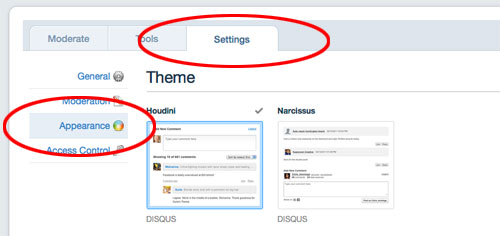
Finally I had the head-smacking realization that if you just log into your dashboard on Disqus, select the “Settings” tab, and the “Appearance” category – voila – there is a “comment count link” section at the bottom that let’s you set custom text for “Zero Comments”, “One Comments” or “Multiple Comments”. And (facepalm) these settings are propagated to your WordPress site.
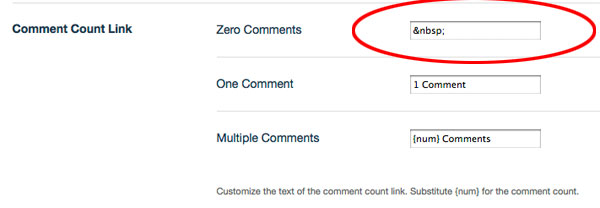
One final hurdle is that Disqus doesn’t seem to let you set the “Zero Comments” field to hide (in fact entering no value caused a pretty scary error message). But you can set that field to, the webmasters favourite hack: “ ” (a non breaking space) – which effectively hides the “0 Comments”.
See what I mean about not exactly being “elegant”? Shut up. It works.
88 responses so far ↓
1 Andrew David Ferris // May 10, 2013 at 11:37 am
I’m having the same problem with my website http://www.andrewferris.com
Can anyone help me please?
2 Brad Fox // May 10, 2013 at 11:46 am
Hi Andrew, you don’t seem to be using Disqus to power your comments so none of this will be particularly applicable. If you’re looking to hide the comments counter, that will require editing your theme directly – your theme author might have a comments or support section directly (or you could ask at WordPress.org forums, just make sure to be very clear about what plugins and themes your blog is running and what you’re trying to accomplish).
3 Cam // May 11, 2013 at 10:12 pm
Nice 🙂 Disqus really is way ahead with it’s commenting platform. I am starting to feel as thought sites without it seem a bit behind :p Great little trick! Thanks!
4 Magento Development // May 16, 2013 at 1:12 am
This was the must needed post for me. Thanks a lot for this helpful post which helps me a lot and others as well. Nice sharing.
5 Andrew David Ferris // May 17, 2013 at 1:48 pm
Thank you so much, I cracked it now!
6 Pretty Trae // Jun 13, 2013 at 11:22 pm
This doesn’t work. :/ I had really hoped it would. Sigh…
7 Brad Fox // Jun 14, 2013 at 2:20 am
Your website doesn’t use Disqus for comments so none of this will be applicable to you, unfortunately.
8 Pretty Trae // Jun 14, 2013 at 2:47 am
Yes, it does. Have you viewed my website..? http://myprettyblog.com
9 Pretty Trae // Jun 14, 2013 at 2:49 am
And why would I be looking for a way to ‘hide disqus comment count’ if I’m not using disqus to begin with?? *scratching head*
10 Brad Fox // Jun 14, 2013 at 1:09 pm
Sorry, I didn’t see it underneath the facebook plugin (whose width seems to breaking your design at least on Firefox and iOS – you might want to look at forcing it to 500px or so in the plugin settings).
I have no idea why people who don’t use Disqus would come here to comment but if you read the thread it’s a pretty common issue for some reason.
Having multiple comment plugins could be part of the problem on your site (I have no way of knowing how the two interact with each other and WordPress) – but see the comments below from “Angel” if you disable “2012 interface mode” you can sometimes re-set the comment settings and then re-enable “2012 interface” – and still get the result your looking for.
11 Pretty Trae // Jun 16, 2013 at 4:22 am
It’s okay. Thank you for the info. That was helpful.
12 gilmarzinho // Jul 4, 2013 at 10:49 pm
Thank you!
13 Mona Ali // Jun 19, 2014 at 3:25 am
تنظي٠Ùلل بالرياض
شركه عزل
خزانات بالمدينه المنوره
شركة تنظي٠بالقطيÙ
شركة تنظي٠بيارات
بالأØساء
nile7seo
nile7
nile7
nile7
14 Sarah Lee // Jul 10, 2014 at 8:41 pm
I really enjoyed reading your article. I found this as an informative and interesting post, so i think it is very useful and knowledgeable. I would like to thank you for the effort you have made in writing this article.
edupdf.org
15 friv2468 // Oct 26, 2014 at 9:33 am
Those of the interesting information you always bring out the best that I know, thanks.
16 Abhay Udgire // May 21, 2015 at 2:20 am
Nice post it works for me thank you.
17 Maman Seo // May 27, 2015 at 5:07 pm
tnq so much bradfox ,information that is very valuable to me ! good luck and verygood website دانلود Ùیلتر Ø´Ú©Ù†
18 Vild // May 30, 2015 at 11:02 pm
This is A usuful trick , thank you for notification and i wil try to use it min my site , you can take a look there also : Bon Prix Tunisie
19 roknnagd // Jun 2, 2015 at 12:08 am
Good post this ….
20 Fahim Zada // Jun 27, 2015 at 7:28 am
Online girls chat rooms join for free no registration needed 🙂
Chat Rooms
Pakistani chat rooms
21 Usama Arshad // Jul 25, 2015 at 11:37 am
Just what I was looking for. Appreciate that you jot down this as I was banging my head against wall trying to edit core PHP files of Disqus.
22 Jon Frost // Sep 20, 2015 at 10:28 pm
Thanks!
23 Pony // Nov 26, 2015 at 9:32 pm
Thanks! I love my little pony friendship pony games
24 frivcu // Feb 19, 2016 at 9:44 am
This is A usuful trick , thank you for notification and i wil try to use it min my site
25 Олег Полторацкий // Apr 29, 2016 at 7:51 pm
Great! Thanks so much. But just right now, I’ve found, that this discus’s page doesn’t work. How do you think, it is temporary or they’ve changed configuration?
26 Nick // May 26, 2016 at 11:52 am
So it worked to eliminate the “0 Comments” text, but I’m still left with a blue square that links to the comments in the post. http://www.patientambition.com Any way to totally eliminate the box? I have Disqus on two sites with the same theme, on the other one the comments counter is gone, I don’t remember doing anything with Disqus settings on that one though.
27 Ato ni Bai // Apr 17, 2017 at 3:40 pm
I have waiting 5-10minutes after making changes to but not sure, its not working on my site: https://www.atonibai.com/
28 NewsPapersStore // Feb 21, 2019 at 3:49 am
Thanks for the tutorial. This post may help me for hide comment link in WordPress duration I using disqus plugin.
29 Win999bet // Jul 2, 2019 at 2:34 am
Better facebook comment because change permalink comment not found
30 ????? ????????? // Jul 6, 2019 at 5:31 am
This Blog Is nice.
Thank
31 tinghaha tingjaja // Jul 9, 2019 at 6:29 am
very good
https://xn--2020-zeo9ewa2g5c8j.com/
32 ????? ????????? // Aug 28, 2019 at 6:40 am
Nice Blog
33 six6up online // Aug 30, 2019 at 4:58 am
Is good information
34 NAVASJO // Sep 4, 2019 at 8:01 am
useful for me.
35 six6up online // Sep 9, 2019 at 9:26 am
good
36 chatchai thongwichian // Sep 11, 2019 at 6:25 am
goodjob
37 Ufa 298 // Sep 27, 2019 at 3:33 am
Nice Blog
38 chatchai thongwichian // Dec 19, 2019 at 5:31 am
gooddd 5555 <a href="#"www.six6pro.com/??????????????????/
Leave a Comment